Tikit presentation

15 slides, print ready. Use the button to export the PDF.

tikit

Railway booking for the common man

Book confirmed train tickets in under 6 taps through the app, an AI chat assistant, or a phone call on any feature phone.

6 taps vs IRCTC 30+App + Chat + CallRazorpay test checkoutIRCTC verified numbers

Entrepreneurship Development Lab · Group Tap 2 Track (A3) · Working prototype
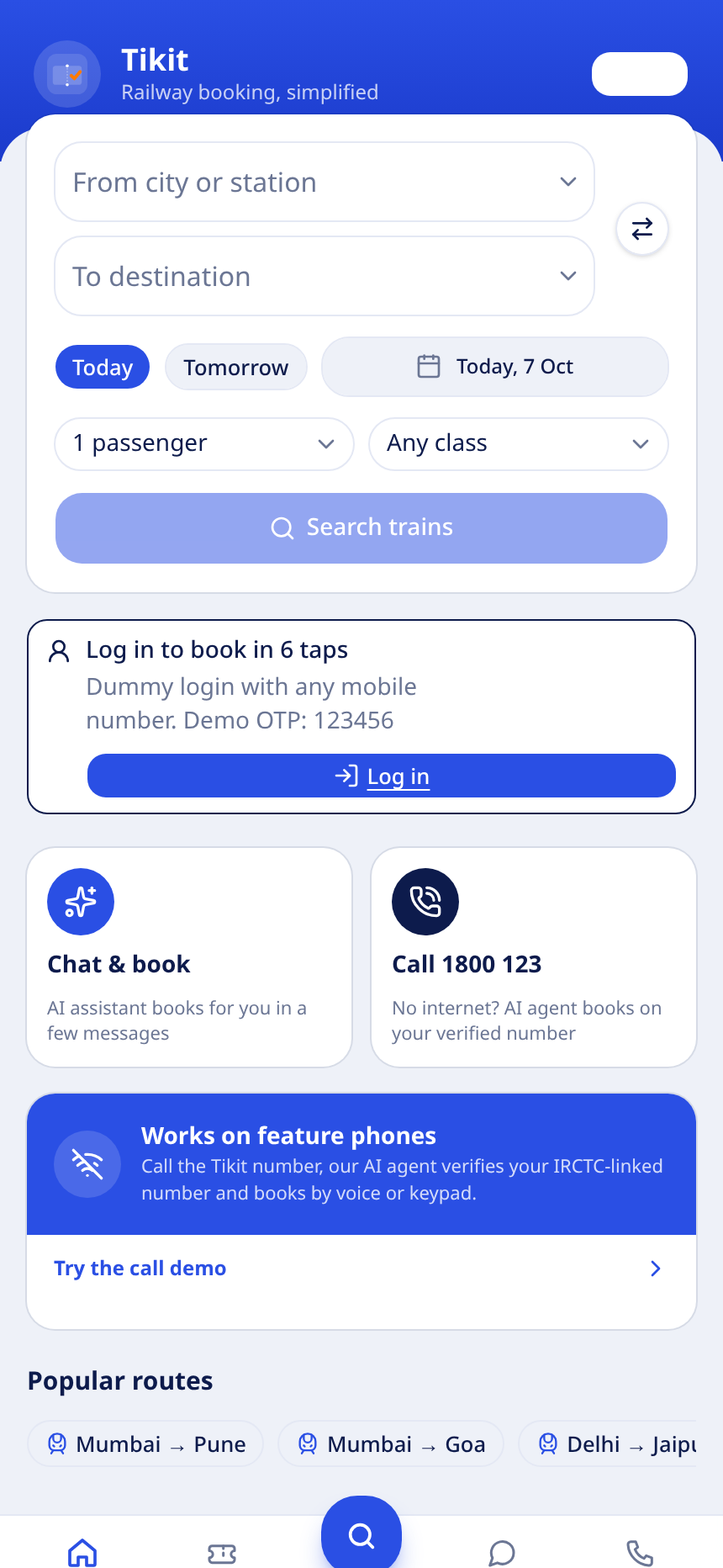
Tikit app home
01

01 · Problem

Booking a train ticket is still hard for the common man

IRCTC works, but the experience excludes the people who need it most: first time internet users, daily commuters and feature phone owners.

30+ taps to book one ticket

85% of our 30 survey respondents said the IRCTC flow takes too many steps, averaging 25 to 30 taps per booking.

Sessions and payments fail

Login timeouts, failed payments and re-entered passenger details force users to start the journey again.

Feature phone users are left out

No internet and no app means no booking. Counters and agents are the only fallback, and they cost time and money.

Passenger details retyped every trip

No practical master list for the common user, so every booking starts from a blank form.

85%

said too many steps

78%

want a 6-tap app

2 crore+

daily rail travellers

02

02 · Solution

One booking engine, three ways to reach it

Tikit wraps the same verified booking flow into the app, a chat assistant and a phone helpline, so the channel does not decide who gets a ticket.

Tikit app

A guided 6-tap wizard with saved stations, saved passengers and one-tap UPI.

/home

AI chat assistant

Type a route in plain language. The bot finds trains, picks a class and pays.

/chat

Call 1800 123 4567

An AI agent verifies the IRCTC number and books by voice or keypad on any phone.

/ivr

Under 6 taps from open to PNR

Saved passenger master list

IRCTC verified mobile number

Razorpay payments with signature verification

Instant refunds to the UPI ID

PNR and waitlist alerts by SMS

03

03 · Workflow

End to end ticket booking flow

Every channel lands on the same engine: search, select, pay, confirm. The store keeps the PNR, seats, waitlist position and refund state.

1. Login

Mobile number + OTP. Number becomes IRCTC verified.

2. Route

From, destination and date with quick Today / Tomorrow.

3. Train

Trains with live seats, fares and waitlist positions.

4. Passengers

Pick from the saved master list or add new.

5. Pay

Razorpay checkout: UPI, card or netbanking.

6. PNR

Confirmed or WL ticket, SMS alert, refund ready.

App channel

6 taps, progress bar and tap counter visible to the user.

Chat channel

Natural language to the same search and booking functions.

Call channel

Voice or DTMF drives the identical state machine.

Reliability: idempotency keys prevent duplicate tickets on retries, availability is deterministic per train, date and class, and every persisted booking is shape validated before render.

04

04 · Screens

Home and verified login
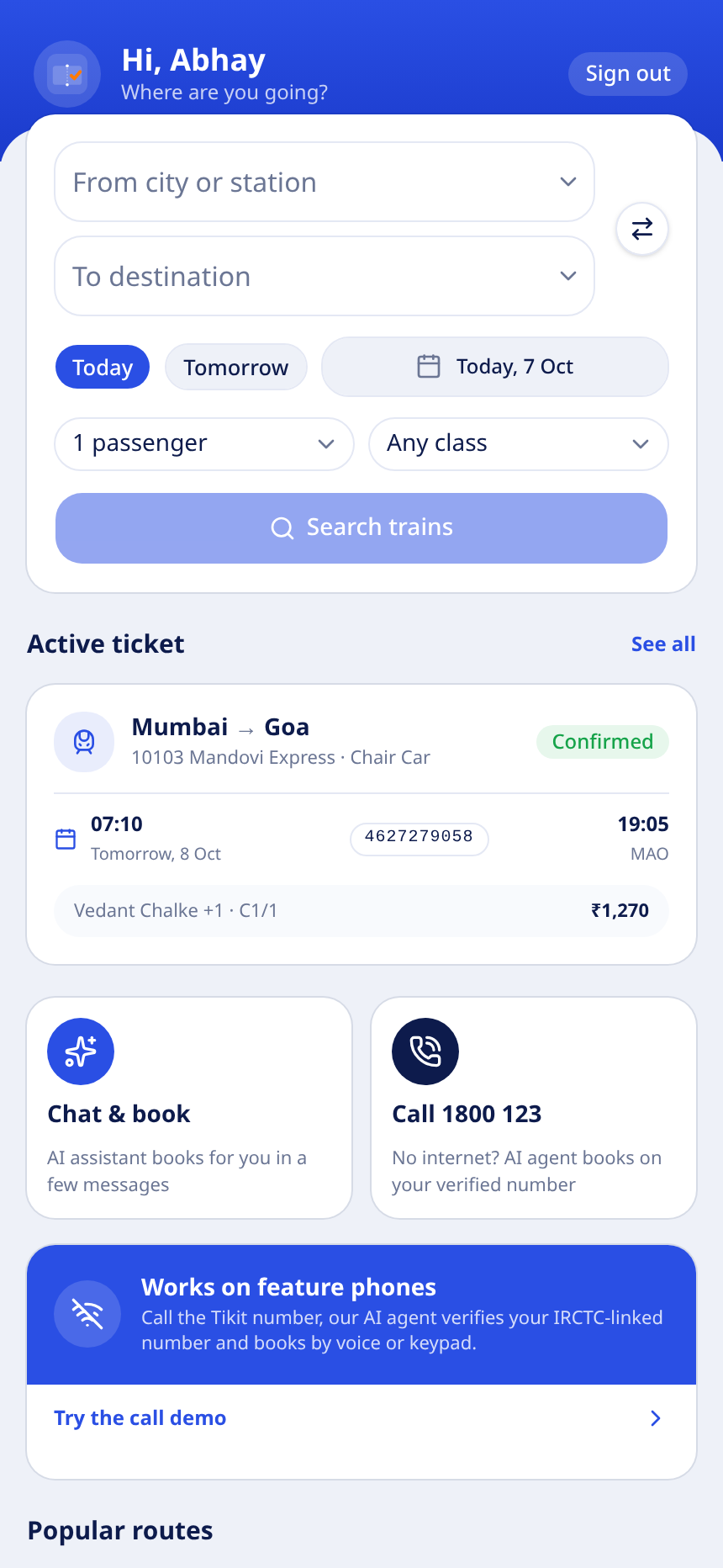
Home: greeting, station search, date picks and popular routes.
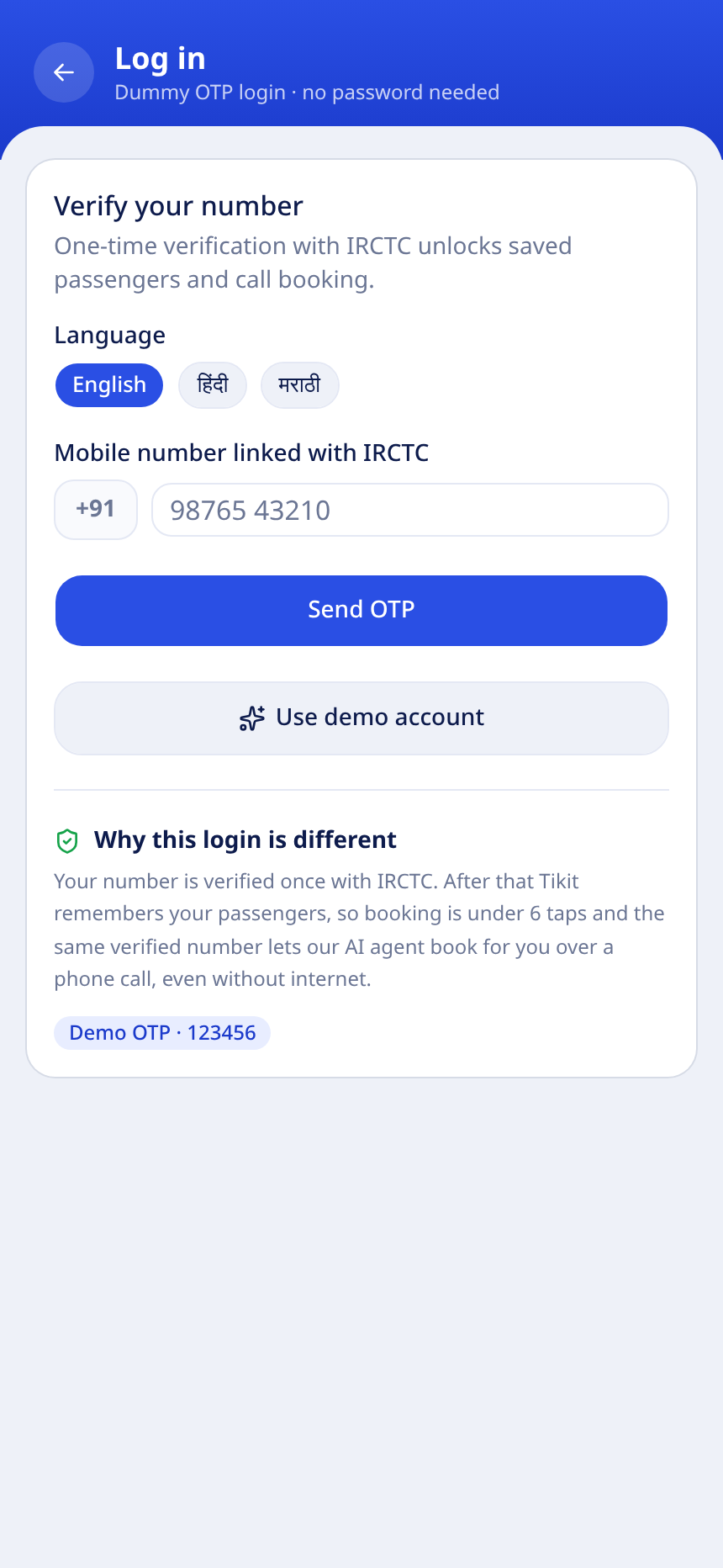
Dummy OTP login. Any number works, demo OTP 123456.

Searchable station combobox replaces the native browser dropdown.

Today and Tomorrow chips keep the common case one tap away.

Passengers and class defaults are remembered per booking.

Verified number unlocks saved passengers and call booking.

05

04 · Screens

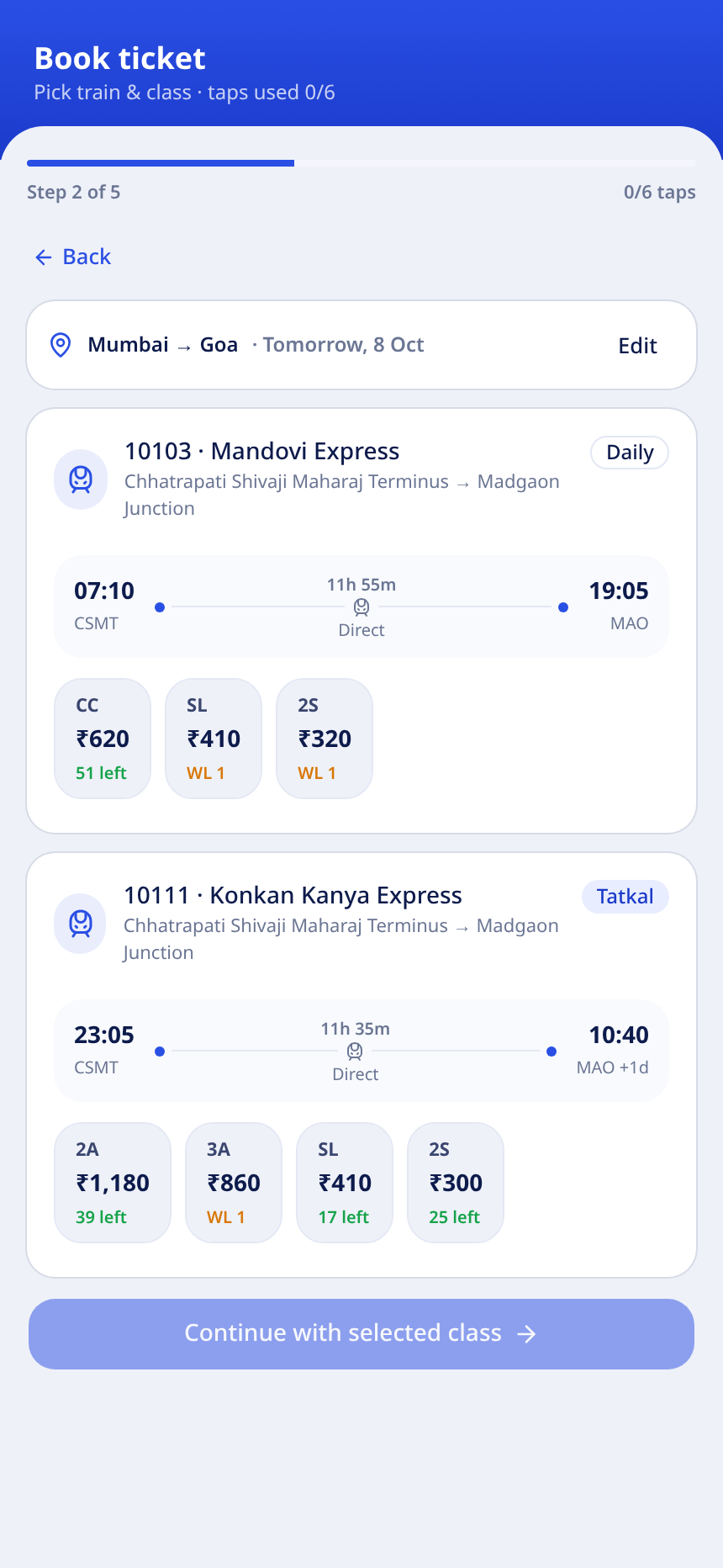
Route search and train selection
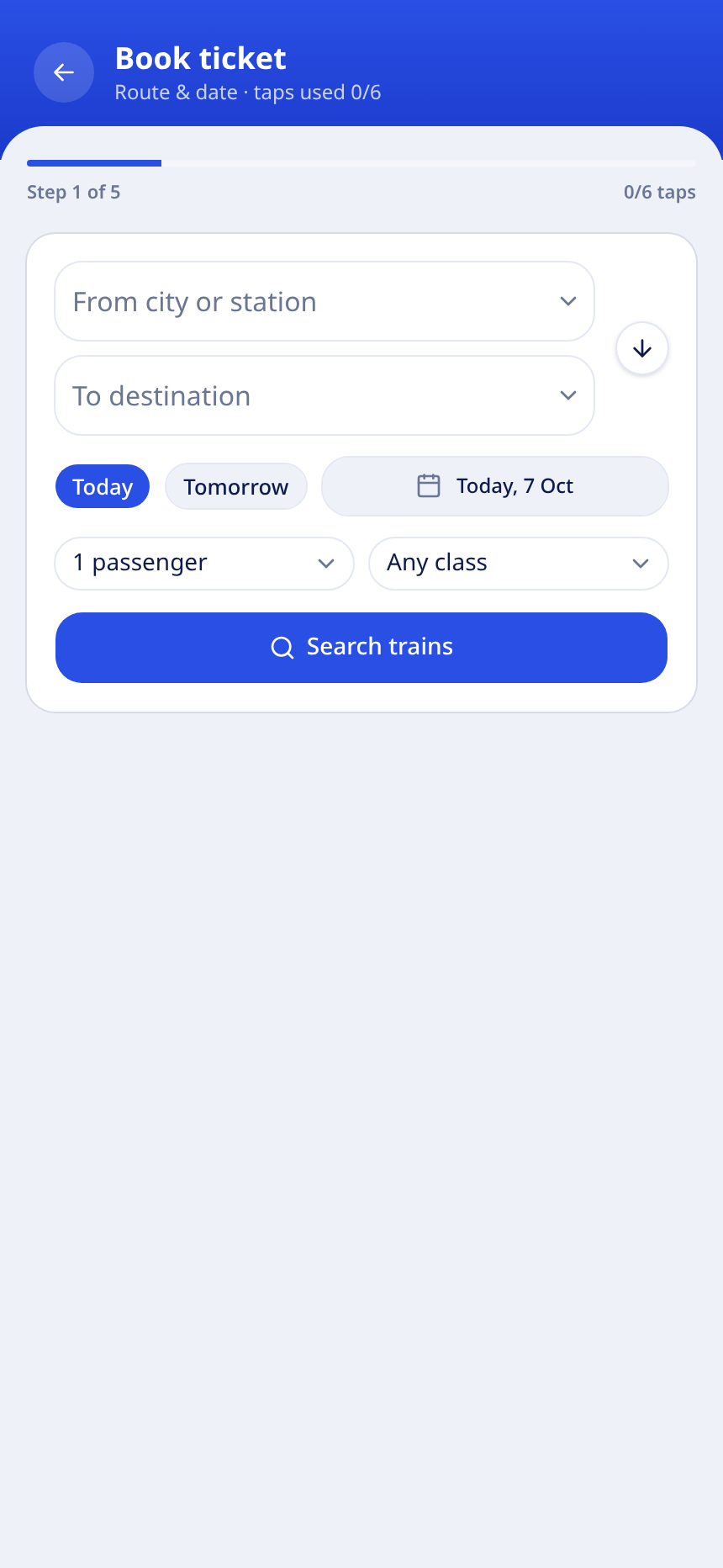
Step 1: from, destination, date, passengers and class.
Step 2: trains with class chips, fares and waitlist positions.

Swap button flips origin and destination in one tap.

Every class chip shows fare, seats left, or the WL position.

Waitlisted classes are highlighted in amber before payment.

Continue is enabled only after a class is picked.

06

04 · Screens

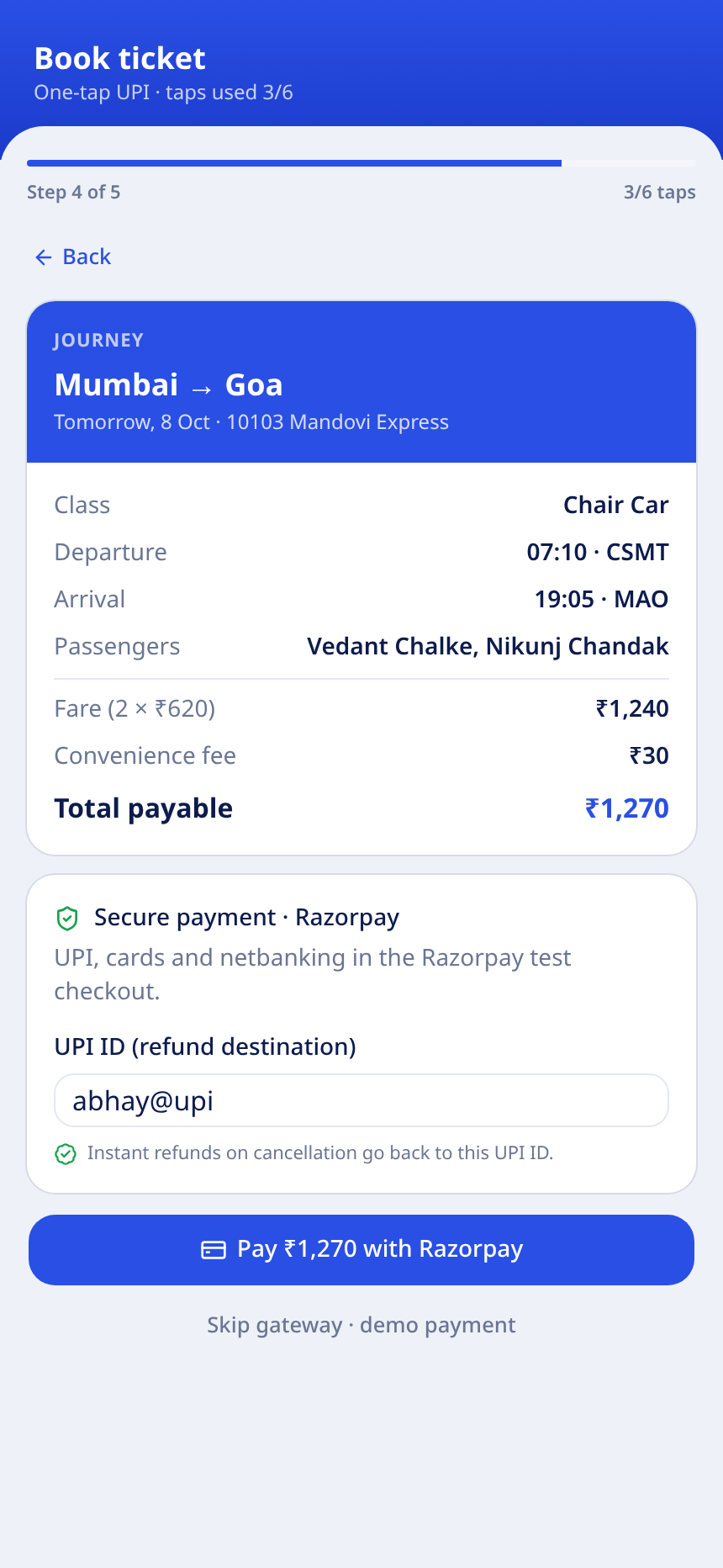
Saved passengers and Razorpay payment
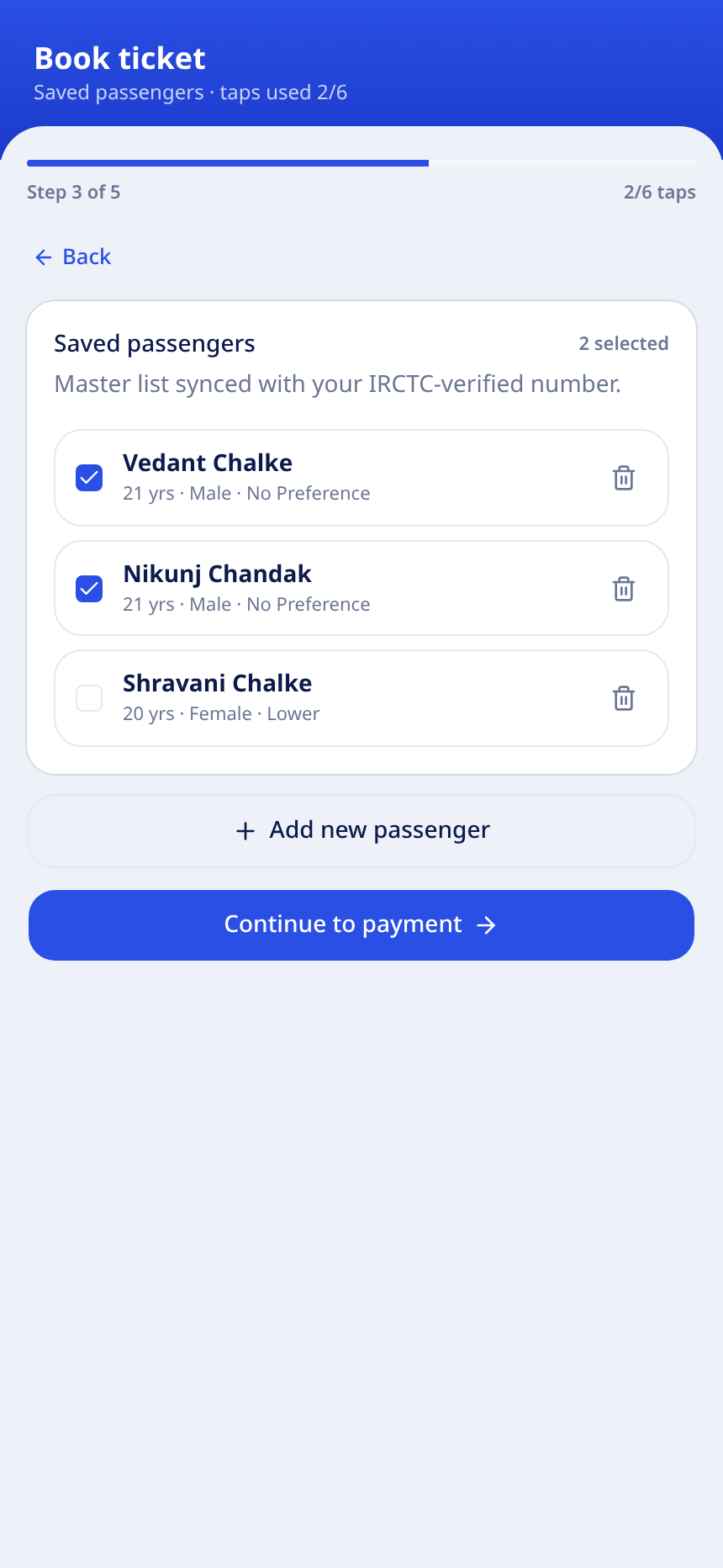
Step 3: master passenger list with checkboxes and add dialog.
Step 4: fare breakdown, waitlist alert and secure Razorpay pay.

Passengers are auto-selected up to the requested count.

Waitlist bookings carry a clear refund promise.

UPI ID is collected as the refund destination.

Demo payment fallback keeps the flow testable without the gateway.

07

04 · Screens

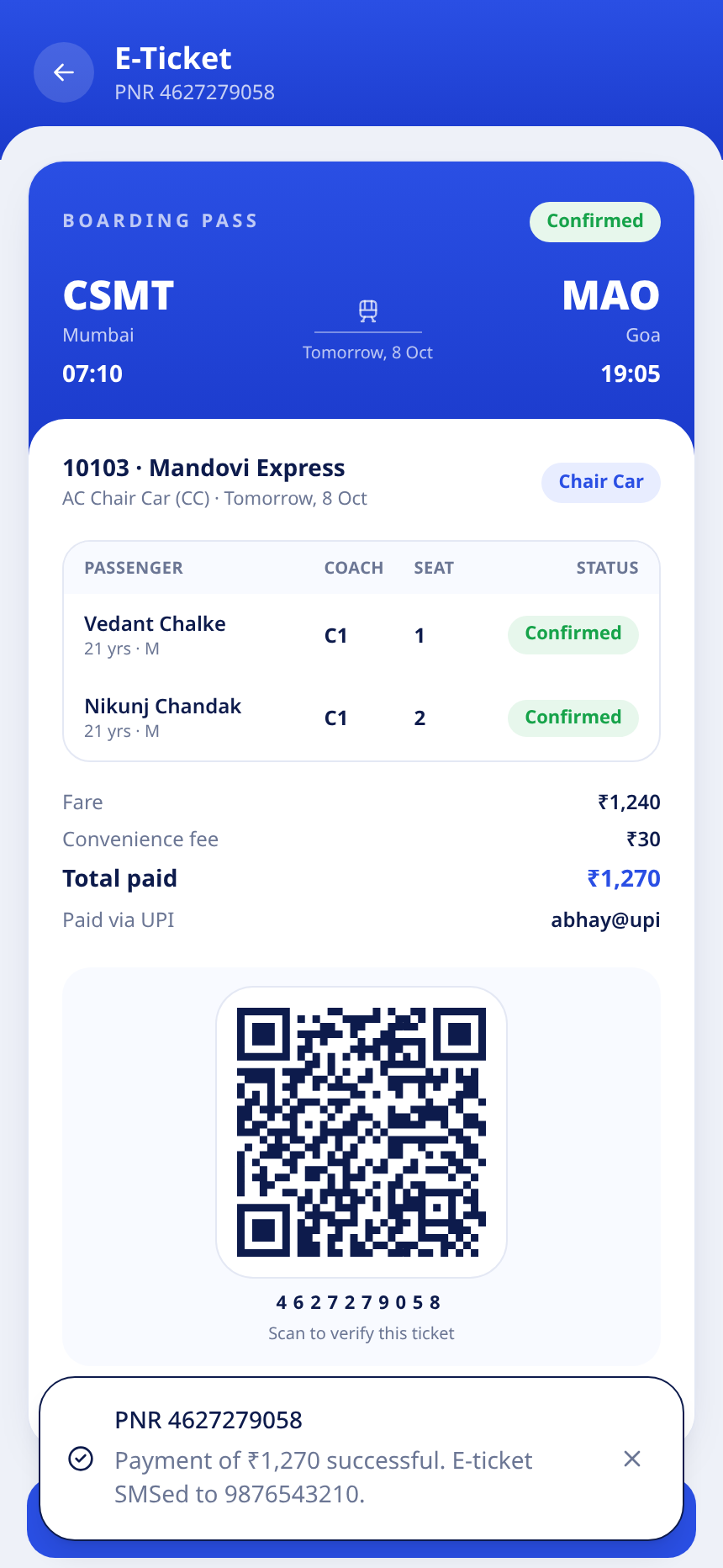
Confirmation and e-ticket
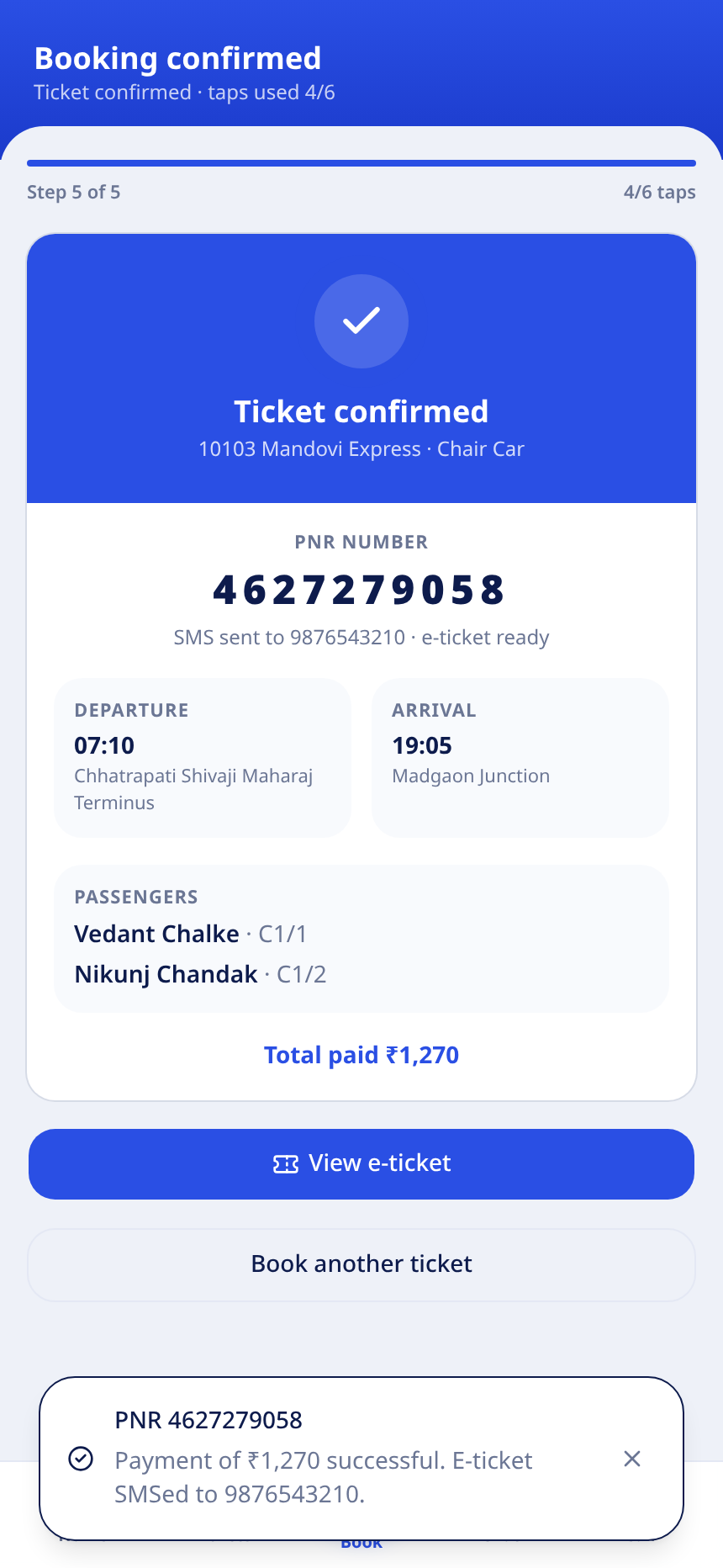
Step 5: PNR, coach and seat for each passenger.
E-ticket with boarding pass layout, QR code and download.

PNR, coach and seat assigned at booking time.

SMS alert with the e-ticket is queued to the verified number.

Cancel issues a full refund to the saved UPI ID.

Downloadable ticket for offline travel.

08

05 · IVR channel

Call booking for feature phones

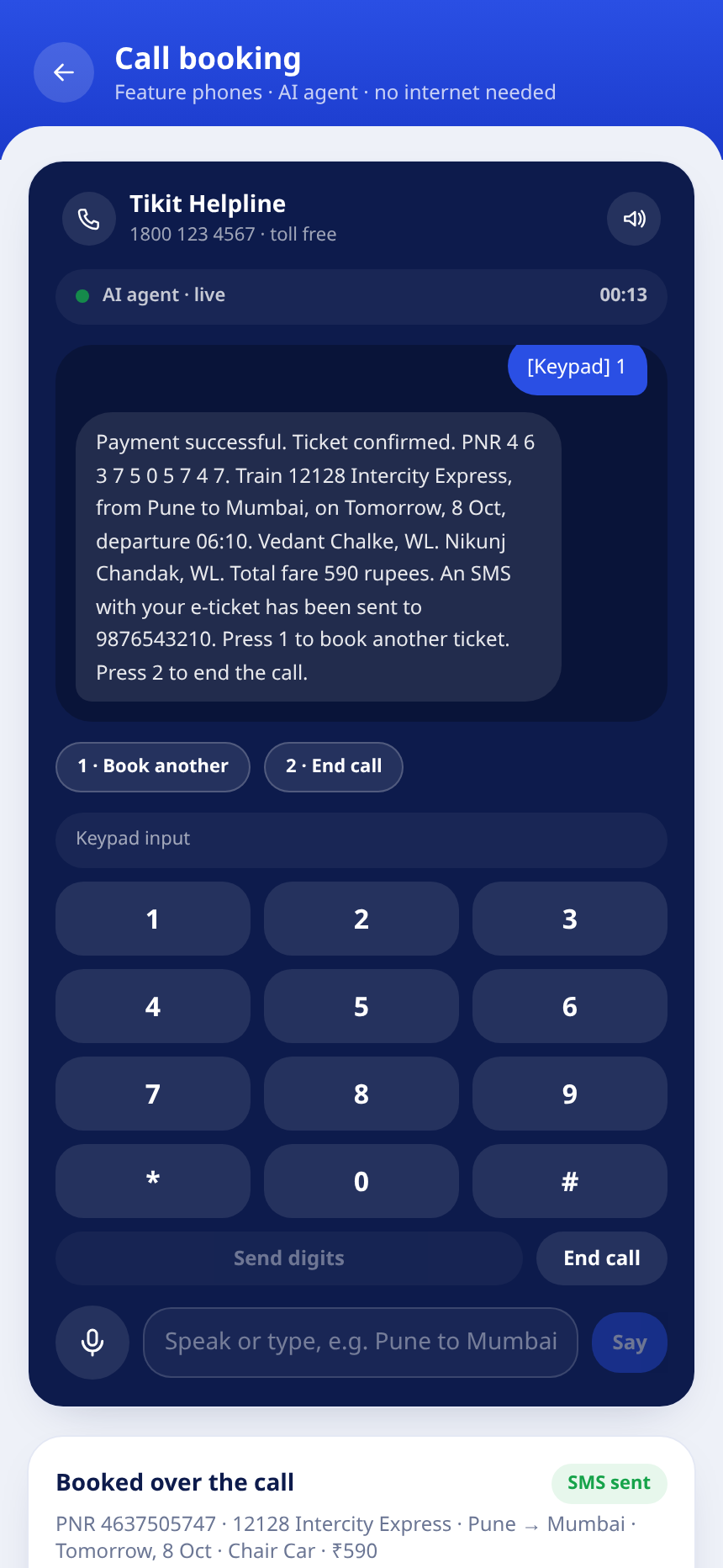
No internet and no app. The caller dials the toll free number and the AI agent books the ticket on the IRCTC verified number.

1

Dial 1800 123 4567

Toll free, works on any feature phone. Call recording notice.

2

Enter the mobile number

Keypad entry of the 10 digit number, or spoken digits.

3

IRCTC verification

The agent matches the number against the verified database.

4

Main menu

1 book ticket, 2 PNR status, 3 last ticket, 0 human agent.

5

Speak the route

For example: Pune to Mumbai tomorrow. DTMF keypad also works.

6

Select and confirm

Train and class by number, passenger count from the saved list.

7

UPI mandate payment

One key press charges the linked UPI account.

8

PNR read out and SMS

The agent reads the PNR and texts the e-ticket.
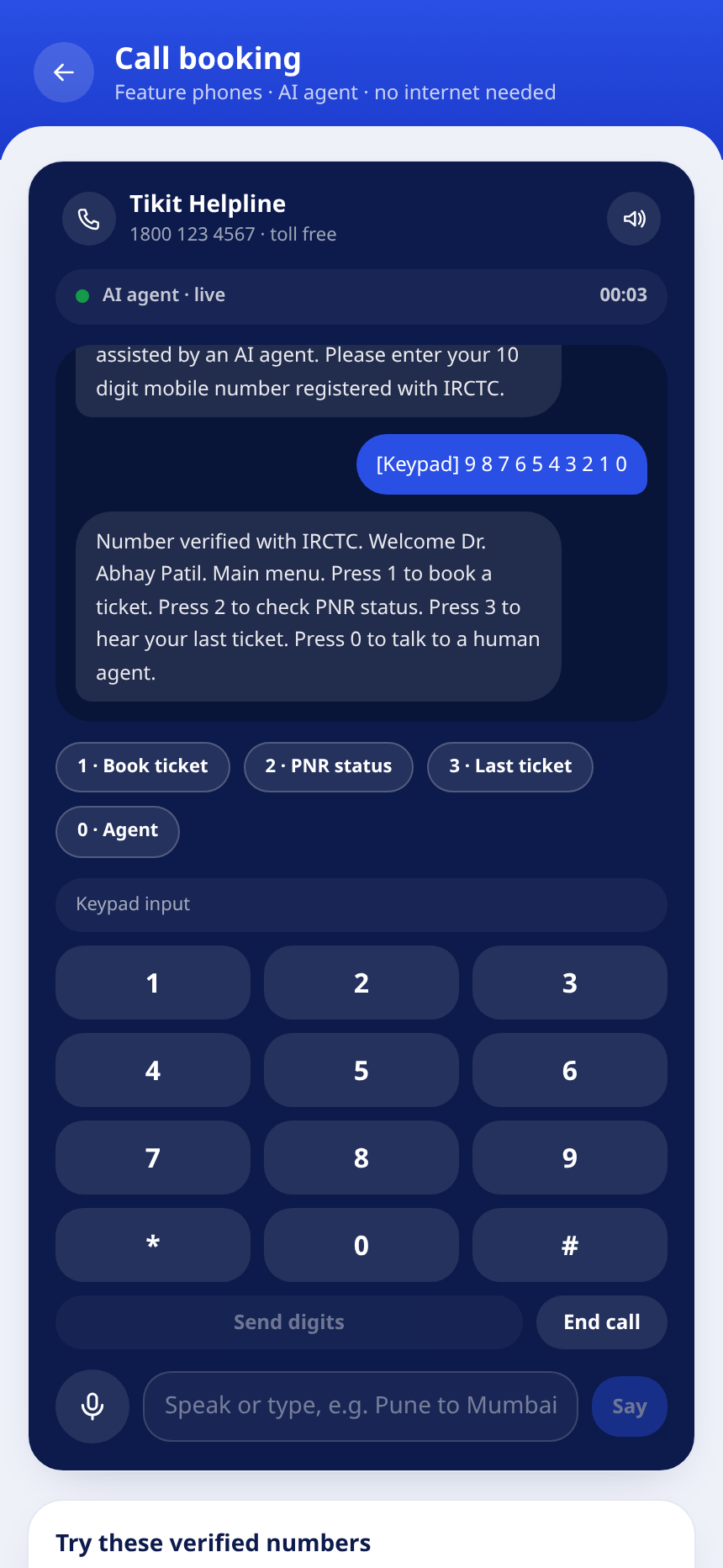
AI agent live: menu after the verified number.
Payment success, PNR read out and SMS queued.

Telephony ready: the agent is a webhook that receives From, Digits, SpeechResult and CallSid, and returns the next prompt. The same API can be pointed at Twilio, Exotel or any IVR provider.

09

06 · Chat channel

AI chat that books real tickets

The assistant understands routes, dates, classes and counts in plain language, including common Hinglish words, then drives the same booking engine.

Language understanding

  • Route extraction: “Mumbai to Goa”, “Pune se Mumbai tak”
  • Dates: today, tomorrow, day after, weekdays, 15 Oct, 15/10
  • Counts: “2 passengers”, “me and my wife”, “family of 4”
  • Classes: sleeper, 3A, 2A, first AC, chair car, second sitting
  • Intents: book, PNR status, cancel, help, greeting

Conversation state machine

idleroutetrainsclasspassengersconfirmpaydone

Quick reply chips let users answer without typing. The PNR card links straight to the e-ticket.

Same engine, same store

Chat bookings carry channel = chat, so analytics and refunds behave exactly like app bookings.
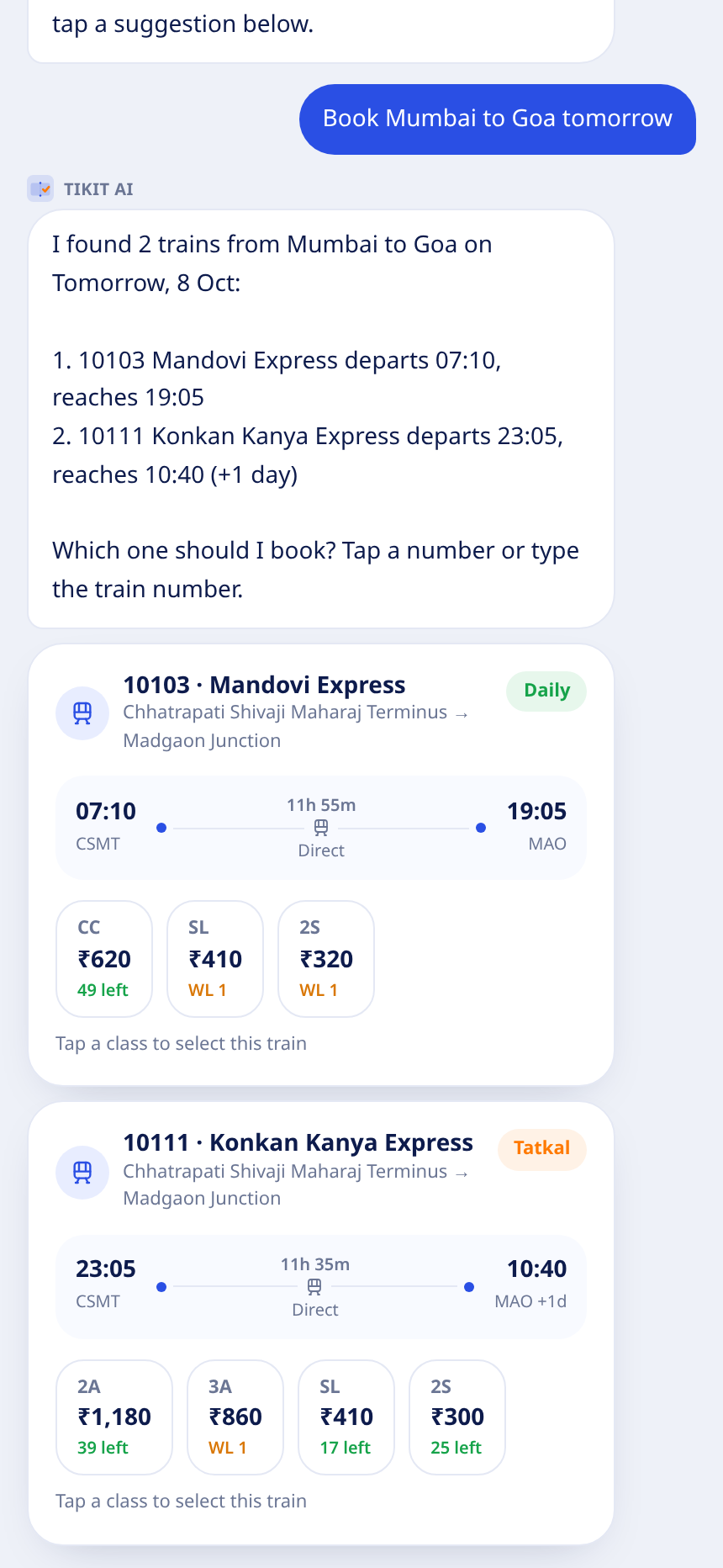
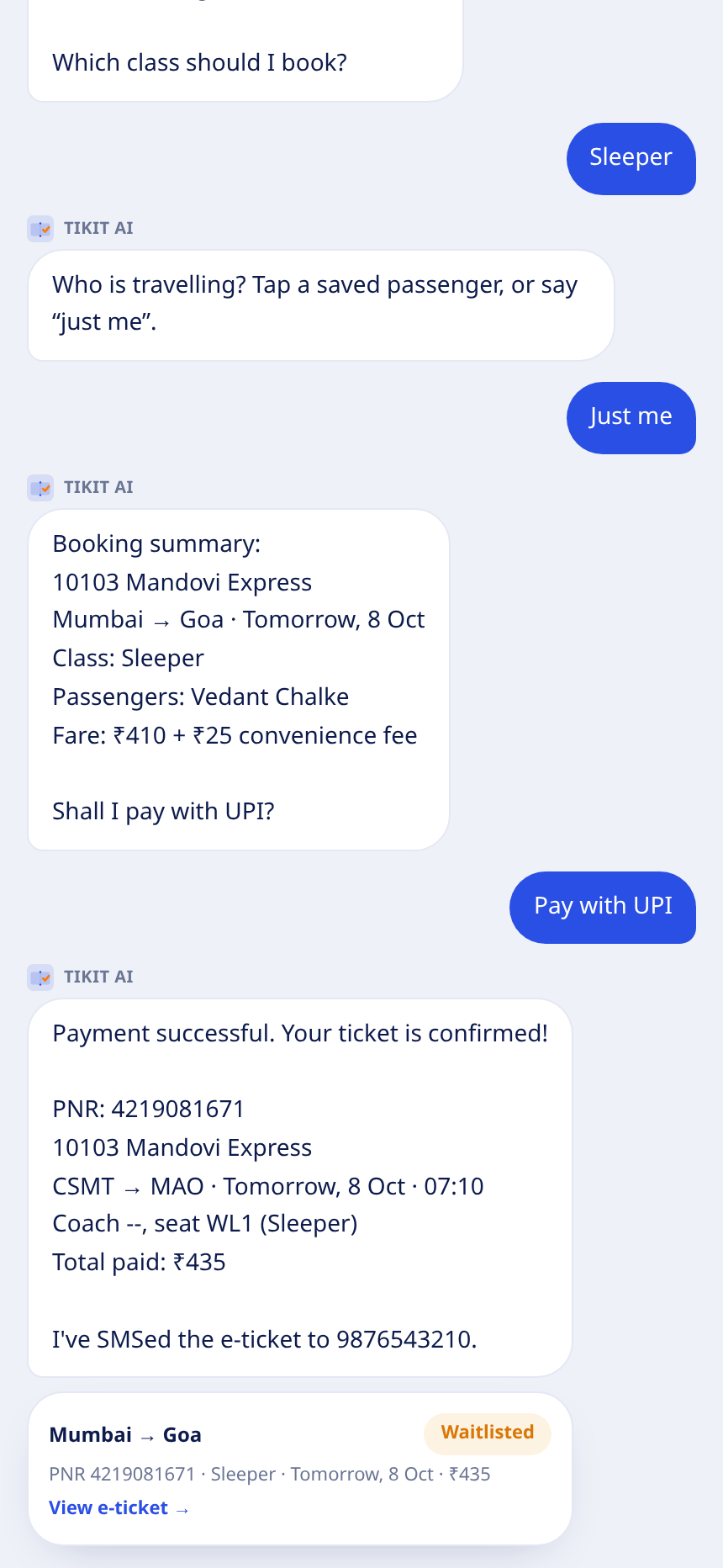
Train options rendered inside the chat with class chips.
Payment success with PNR card and e-ticket link.
10

07 · Payments

Real Razorpay checkout with server side verification

The payment step is not a mock dialog. Orders are created on the server and the signature is verified before a ticket exists.

1

1. Client requests an order

POST /api/razorpay/order with the amount in paise.

2

2. Server creates the order

Basic auth with the key secret calls the Razorpay Orders API.

3

3. Checkout opens

Razorpay dialog for UPI, cards and netbanking in test mode.

4

4. Handler verifies

POST /api/razorpay/verify checks the HMAC SHA256 signature.

5

5. Ticket is created

Only a verified payment creates the booking and PNR.

Keys never touch the client

  • Key secret lives in server environment variables only.
  • Amount is validated server side before the order is created.
  • Invalid signatures return verified false and no ticket is issued.
  • Cancellation refunds to the UPI ID collected on the pay screen.

Demo note: payments run in Razorpay test mode. No real money moves.

11

08 · Issues and fixes

What broke while building, and how we fixed it

Every issue below was found in real testing of the booking flow and resolved in the prototype.

1

Native dropdown looked cheap and inconsistent

Browser datalist autocomplete ignored the app theme

Fix: Replaced with a shadcn Combobox: searchable, themed station picker.

2

Class chips disappeared for some routes

Auto search passed the string any as a class filter, matching nothing

Fix: Filter now applies only real class codes; any means no filter.

3

Ticket page crashed on older saved bookings

Persisted data from an earlier schema had a null total

Fix: Versioned storage key, booking shape validation and safe number formatting.

4

Waitlist was never visible in the demo

Deterministic availability almost always had seats left

Fix: Sold out class and date combos now show WL with a live position.

12

08 · Issues and fixes

Reliability, security and layout fixes

5

Duplicate tickets on retry

Repeated pay taps could create two bookings

Fix: clientRequestId idempotency returns the same PNR for the same request.

6

Razorpay secret could leak to the client

Checkout needs a server order and signature check

Fix: Order and verify routes keep the secret server side and validate HMAC.

7

Booking screen looked unbalanced

Stacked labels and an oversized date button broke the grid

Fix: Rebuilt with the reference layout: swap on the right, compact date row, full width CTA.

8

State growth and malformed data could crash screens

Unbounded collections and unvalidated persisted state

Fix: Bounded maps with eviction, defensive parsing and error safe rendering.

Result: the booking flow now completes end to end on all three channels, with no crashes across repeated bookings, retries and cancelled tickets.

13

09 · Architecture

How the prototype is put together

A single Next.js application serves the UI, the AI agents and the payment API, backed by a deterministic in-memory store.

Next.js 16 App Router

App, chat, call, ticket and presentation routes. Server routes for Razorpay.

Booking engine

searchTrains, createBooking, cancelBooking with seat, waitlist and refund logic.

Channel adapters

chatRespond and ivrRespond parse language and DTMF into the same engine.

Store

Users, passengers, bookings, idempotency keys, availability and SMS outbox.

UI kit

shadcn/ui on Base UI with a Tikit theme: cards, combobox, calendar, select, dialogs, toasts.

Stack

Next.js 16React 19TypeScriptTailwind CSS v4shadcn/uiBase UIRazorpayPlaywright

Deterministic data keeps demos and screenshots reproducible.

SMS outbox simulates PNR and refund notifications.

Screenshots in this deck were captured with Playwright from the running app.

14

Your next ticket is 6 taps away

The prototype is live in this repository. Open the app, chat with the agent, or try the call demo with the verified demo number 98765 43210.

Open the app · /homeChat assistant · /chatCall demo · /ivrPresentation · /presentation
Tikit · Railway booking, simplified · Tap 2 Track (A3)
15